Learning Hugo
Overview
Introduction
I’m having a lot of fun and/or pain so far with wrangling Hugo, which builds this site. I last built hand-tuned HTML back in the early 2000’s, and professionally I’ve been more of a backend engineer and architect and kept the oddities of CSS and HTML 3/4/5 at a comfortable arm’s length. Setting out to blog on a webserver means that I’m going to have to shorten that arm’s length considerably.
My one requirement for this was it’s gotta be fast. Lightning fast. I miss ye olden days of when websites actually loaded and rendered quickly. More and more I’ve been annoyed with websites taking an inordinate amount of time to load and render, blocking content as ads or the last font loads in from some weirdly misbehaving CDN. No tricks, nothing weird, no server-side generation of anything.
I had bumped into Hugo a while ago and bookmarked it, and finally dusted it off. CLI based, backed by Markdown, handles all of the ooey-gooey fluff for me? Sign me up! I have no desire to try and become a HTML, CSS and SASS expert overnight. I was sure that there’d be enough swearing working with the Hugo based Go generators and a theme. And I was right!
It’s absolutely rewarding at times to step clearly outside of your comfort zone and get involved with some technology you’re deeply unfamiliar with. Frustrating would be the first word I’d use, followed by begrudging acceptance and some eventual hard-won victories. You’re looking at the results. Plus, check out that speed:
 1Start building sites …
 2hugo v0.92.2+extended darwin/amd64 BuildDate=unknown
 3
 4                   | EN
 5-------------------+------
 6  Pages            |  12
 7  Paginator pages  |   0
 8  Non-page files   |   3
 9  Static files     | 125
10  Processed images |   0
11  Aliases          |   4
12  Sitemaps         |   1
13  Cleaned          |   0
14
15Total in 282 ms

Everything can be found on my github project.
Site Internals
Theme and modules
Hugo 0.92.2 extended.
Right now I’m running the Clarity
theme, with some modifications.
There’s been a rather large change in how Hugo handles themes and various
plugins and modules. Old style workflows had you running git submodule add
to pull in source code, which is the worst way to do work. Frankly, when you
see that in documentation you should consider running, or at least being
deeply skeptical of the authors.
The new way of working in Hugo to declare a module, and it’s much cleaner. Modules act as self-contained components, and the… temptation… of editing files directly and damning yourself to git hell is gone. The only gotcha was that the actual site itself needed to be a module. Some of the documentation isn’t exactly clear on this, and you don’t need anything special or github-based to enable modules.
1 $ hugo mod init labonski-dummy
From there, all you need for a theme install is to pull it in via a mod
1[module]
2    [[module.imports]]
3        path = "github.com/chipzoller/hugo-clarity"
Updating is easy enough with hugo mod get -u.
Customizing
Modules make pulling in themes easy, they make modification harder. You have to craft a series of overrides, and hope that the theme author did their homework and made it easy to poke and prod. Without much to compare against (given by depth with Hugo), I’m happy so far with Clarity.
My Adobe photography license gives me access to their whole font catalog,
which is surprising. The main body font is Minion
3, which is one of my favorites. I
yoinked the {woff2,woff,otf} files from their generated CSS and transferred
them to the theme’s recommended landing spot, _custom.sass.
 1@font-face
 2    font-family: 'Minion'
 3    font-style: normal
 4    font-weight: 400
 5    src: url('#{$font-path}/minion3/regular.woff2') format('woff2'), url('#{$font-path}/minion3/regular.woff') format('woff'), url('#{$font-path}/minion3/regular.otf') format('opentype')
 6    font-display: swap
 7
 8@font-face
 9    font-family: 'Minion'
10    font-style: italic
11    font-weight: 400
12    src: url('#{$font-path}/minion3/italic.woff2') format('woff2'), url('#{$font-path}/minion3/italic.woff') format('woff'), url('#{$font-path}/minion3/italic.otf') format('opentype')
13    font-display: swap
14
15// and so on...
and then _override.sass
1html
2    --font: "Minion", Merriweather, Georgia, "Times New Roman", serif
3    font-feature-settings: "onum" on, "liga" on, "zero" on
4    -moz-osx-font-smoothing: "subpixel-antialiasing"
With Merriweather above being the font Clarity came with. Pro tip: lint your sass. I spent a considerable amount of time (mainly due to being an absolute neophyte with sass and css) tracking down why only the last font in the block loaded. It turned out that a copy-n-pasted TAB inside of the indentation causes sass to interpret blocks differently. Hugo provided no warnings about inconsistent tabs, and VS Code was quiet. A fun few hours! This is what it looks like:
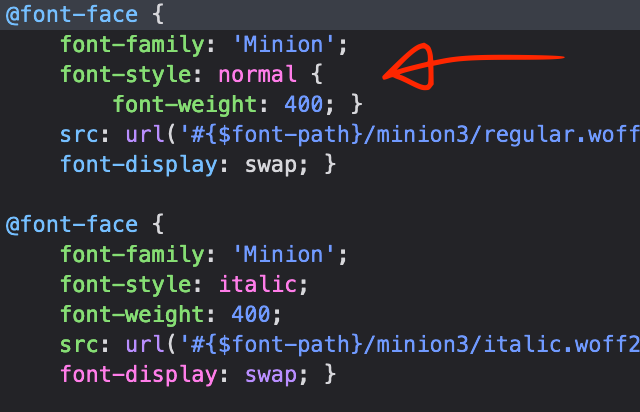
If you’re loading fonts and only the last one takes (or none at all), check your indentation!
For an accent I tossed in Forma DJR Micro
Light for post headings and
navigation to switch things up a little. While this sounds like I know what I
was doing, I merely followed a bunch of recommended fonts from Adobe. I tried
a few and settled on the light, airy lines of Forma, which is a nice contrast
to the seriousness of Minion. _override.sass continues:
 1$title_font: "Forma DJR Micro";
 2
 3.post_title
 4    font-family: $title_font
 5    font-style: normal
 6
 7.post_link
 8    font-family: $title_font
 9    font-style: normal
10
11.author_header
12    font-family: $title_font
13    font-style: normal
14
15.mt-4
16    font-family: $title_font
17    font-style: normal
18
19.nav_item
20    font-family: $title_font
21    font-style: normal
TODO
- Figure out why
-moz-osx-font-smoothingisn’t getting set right. It makes the fonts a bit unnaturally thin and hard to read on MacOS - Finish the About page
- Why aren’t line numbers in code blocks working?
- Finalize the post archetype metadata
- Set up content categories and tags
- Tweak colors. Red inline
code text? Wow. - Set up some linters
- Set up CI: end goal is commit to post
And, uh…
- Write content
Conclusion
I spent a lot of time wrestling with SASS and CSS and fonts, mainly because I love good typography but also because I have no idea how most of it works, and it gives immediate feedback. It says a bit about me that I’ll spend days hammering out the sass override pipeline instead of writing content.